Say what you want done.
AVO handles the clicks.
For people who find using a mouse or trackpad difficult.
0%AVO 78%Agent alone wrong result, reported done without clarification3 tasks · 9 runs per setup · scripted answers
Recorded live, by voice; the thinking is cut short.
AVO is a Mac app that works your computer for you. Say what you want done, and it plans the steps, then clicks and types on your screen. Before pointer actions it checks target location and ambiguity. When two things could fit, it circles both and asks. You answer with one word.
- 1Say it
Tap right ⌥ and say what you want, or type it.
- 2AVO does it
It plans the steps and operates the apps on your screen.
- 3It asks when unsure
Two possible targets? It circles both. You say “two”.
One sentence in. Clarify before acting.
AVO reviews proposed pointer actions for ambiguity and target location before executing them.
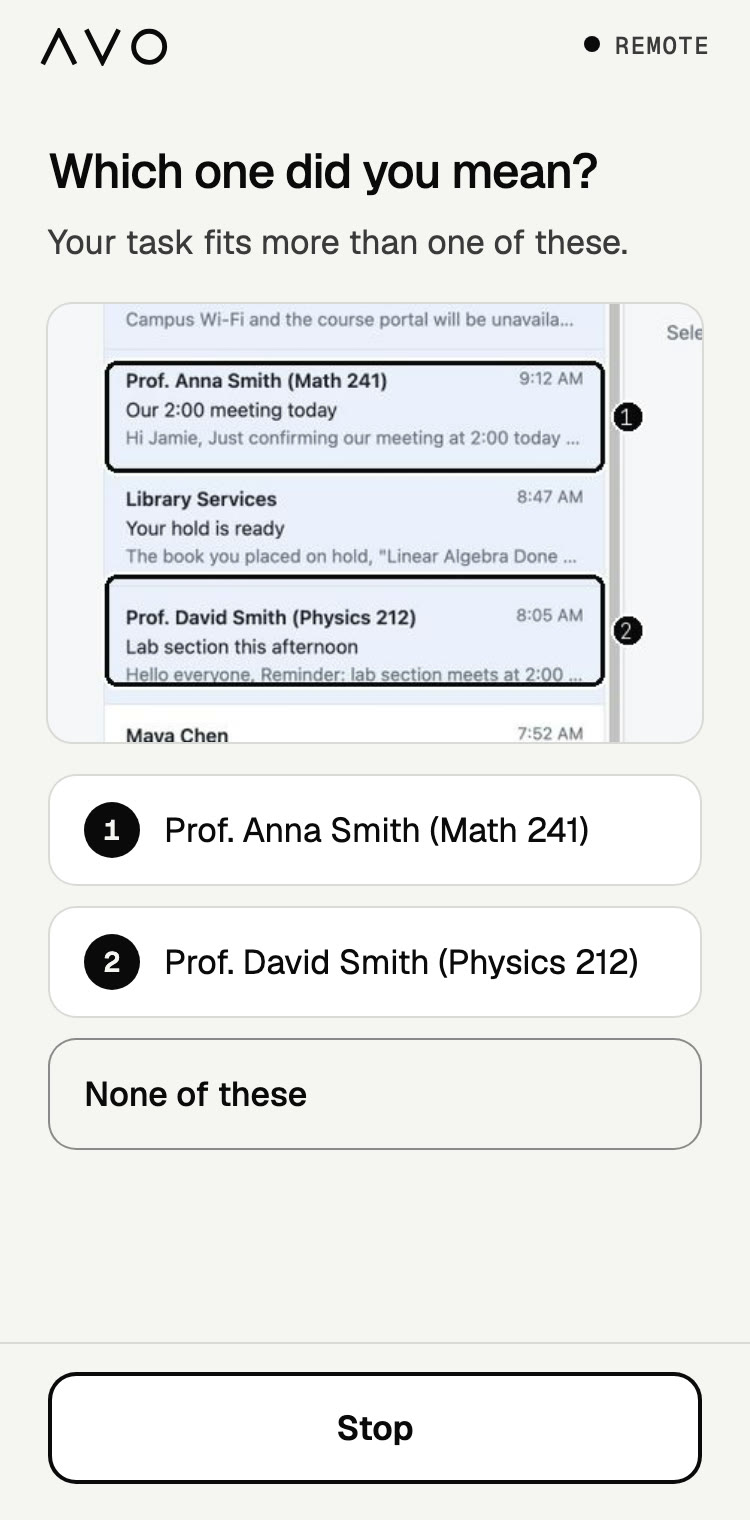
Two professors named Smith, two handouts with the same name: AVO circles each one and asks which.
AVO highlights what it’s about to click and counts down one second. Say “no” to stop it.
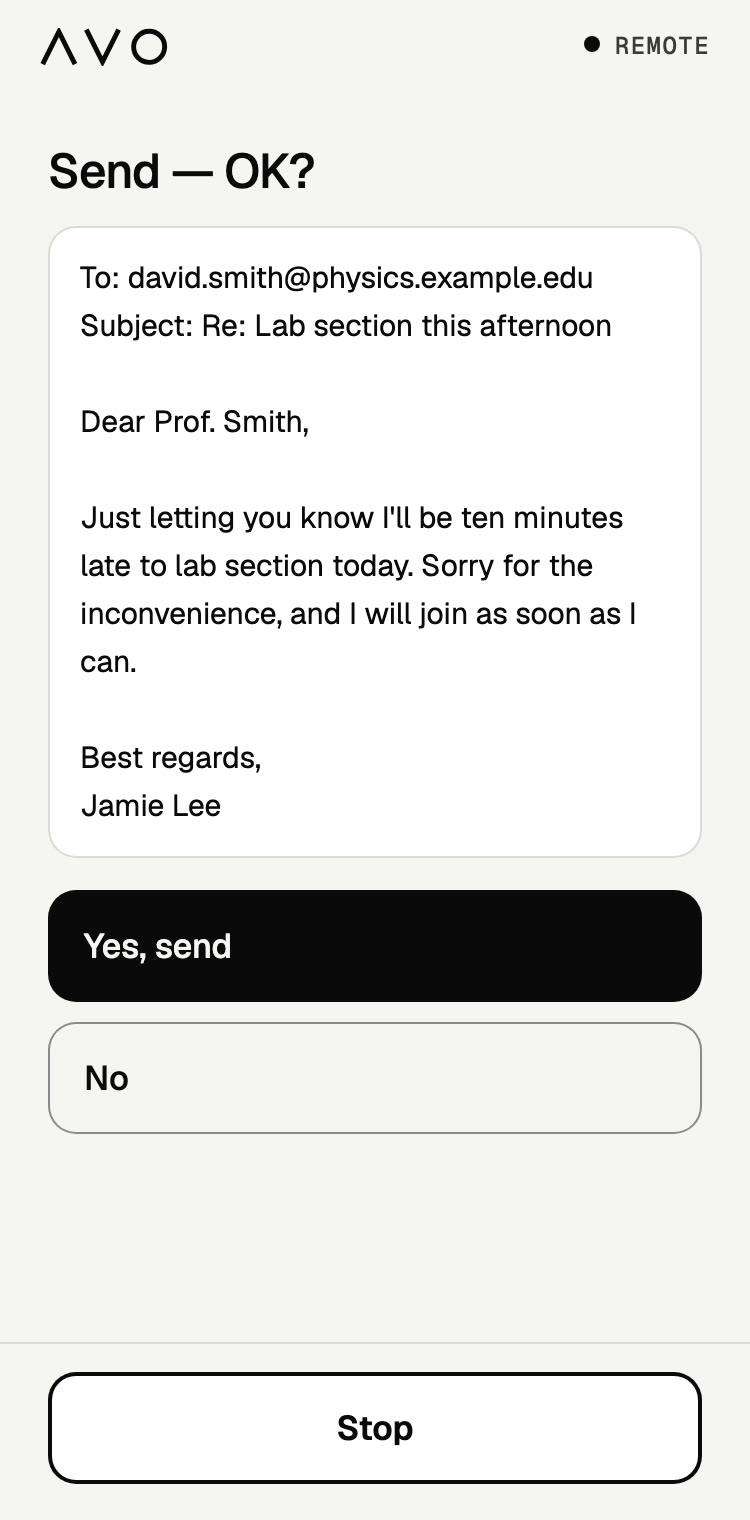
Send, submit, delete, pay, book: AVO shows what will happen (the reply it wrote, say) and waits for your “yes”.
- Your request spoken, typed, or a rough box.
- Muse Spark plans the steps and operates the screen; Muse Wonder re-plans complex or stalled tasks.
- Pre-action check ambiguous target? target located precisely (SAM 3.1)? irreversible action?
- Ambiguous circles each option, asks which.
- Clear and reversible highlights the target, proceeds after 1 s unless you say “no”.
- Irreversible shows a preview, requires an explicit “yes”.
Muse Voice TranscribeHears you
Without it, “Smith” is heard as “Smyth”. The names on your screen help it hear.
Muse SparkPlans and acts
Without it, nobody notices two people fit the task. It also checks every step before it happens.
Muse WonderRe-plans when stuck
Without it, a dead end means clicking the same thing again.
SAM 3.1Finds the exact target
Without it, a rough box is just a rough box. It finds the exact button inside it.
You say it. It points back.
01You say it.
Tap right ⌥ and say what you want. Typing works too.
More
A tap, not a hold. The words appear in large type as you speak, and the names on your screen help AVO hear “Smith” as Smith. Click the island to type instead.
02It points back.
When two things fit, AVO rings both and asks. Answer with one word.
More
Each one gets a ring and a number. Answer with a word (“two”, “the physics one”, “none of these”) or press a number key.
From one hand to a new interaction.
Watch the complete three-minute film. A working prototype, with limited real-world testing.
Watch on YouTube · Direct video · Run the actual agent on Mac
It works from across the room.
Hands busy, or the computer’s across the room? Tell AVO from your phone. When it needs you, the part of the screen it’s asking about comes to you.
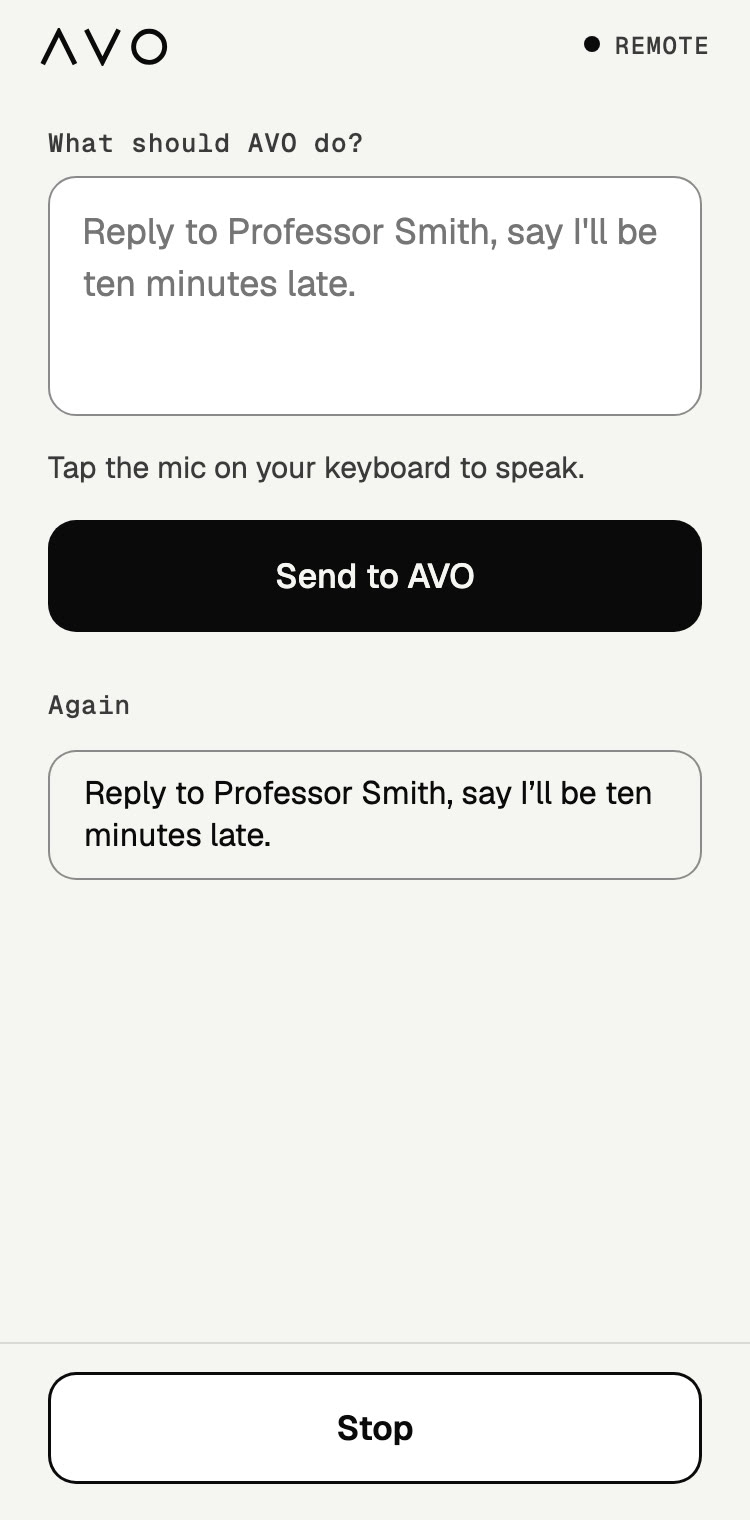
Same Wi‑Fi only · pair with a QR code · stops if the phone disconnects. How it works
Built for people for whom every click costs. Useful to anyone whose hands are busy.
Every click costs something.
For people who can speak clearly, but for whom every precise hand movement is hard.
Built first for 01 and 02.
One sentence, not twenty commands.
- Today
- Voice Control needs every step spelled out.
- With AVO
- Say the outcome; AVO works out the steps.
A rough box is enough.
- Today
- Small targets are missed and retried.
- With AVO
- SAM 3.1 finds the exact button inside your box.
Far fewer clicks.
- Today
- Every click and keystroke adds up.
- With AVO
- One request, done from the desk or from your phone.
The evidence
Small, honest tests. Every number links to how we measured it.
Voice Control takes commands. AVO takes what you mean.
With Voice Control you must know every step and say it. With AVO you say the outcome.
- “Uh okay, click number fifty-one”
- “Click number fifty-one”
- “Click number fifty-one”
- “Show numbers”
- “Click 51”
- “Click 53”
- “Again”
- “Delete.”
- “Delete”
- “I'll be ten minutes late”
- “58”
- “58”
- “Click 58”
13 things said
* said in Chinese, translated
- “Reply to Professor Smith, say I’ll be ten minutes late.”
- “Two.”
- “Yes.”
3 things said
Left: everything said in E1, transcribed. Over 8 tasks: 8/8 vs 2/8 done right. Details
Agents ask for permission. AVO asks for understanding.
What happened: Asked to “reply to Professor Smith”, the agent alone picked Prof. Anna Smith (Math 241) without asking. The reply was meant for Prof. David Smith (Physics 212). This baseline had AVO’s gate and confirmations disabled. It was wrong without asking. Full AVO adds a separate check for which Smith the user means.
Wrong result, reported done without clarification · 3 ambiguous tasks · 9 runs per setup · scripted answers, not a user study. How we measured
A rough box is enough.

Why I built AVO
Last summer, during my software engineering internship, I broke my hand climbing.
Writing software with one hand was frightening. Two things stayed with me. For many people, this is every day. And there has to be a better way for people and AI to work a computer together.
— Bowen
working-age adults has some difficulty with dexterity; 7% have a severe one.
Forrester Research for Microsoft, 2003US adults are limited in their daily activities by arthritis.
CDC, MMWR, 2016–2018 dataAmericans may have essential tremor, which most often shakes the hands.
Louis & Ottman, 2014 (an estimate)US figures, from the sources linked under each.
What AVO can’t do yet.
- Speaking is hard for you: voice is the main input (typing works too).
- You use a screen reader: AVO asks with circles on the screen.
- Not yet tried by the people it’s for.
- Needs a network and the Meta Model API.
- macOS only, main display, best in the browser.
Your screen, your call.
- Screenshots and task context go to Meta for inference; see the data details below.
- Detected irreversible actions require “yes”; detection is heuristic.
- Say “stop” any time; if Remote’s phone disconnects, AVO pauses.
Every number, with its limits.
Small samples, run by the author. Each says what it can and can’t show. Full tables in docs/eval.md.
E1 · Voice Control vs AVO, eight everyday tasks
1 One tester, the author, new to Voice Control; AVO’s side run by script. Read the numbers with that in mind.
Each task done once with macOS Voice Control and once with AVO, by voice: five on the demo pages AVO was built on (reply to an email, book a room, download a handout, fill an expense form, assign a card) and three new to it (a fact on Wikipedia, a search on Meta Careers, moving a file in Finder). Success was checked by the page itself, the disk, or the answer, not by eye.
On the 5 demo pages Voice Control got 2 right and AVO 5; on the 3 new tasks, 0 and 3. “Said” is the median number of things said per task, counted from the audio with Meta’s speech recognition.
Limits: one tester, the author, who has no motor impairment and was new to Voice Control. AVO’s side was run by script, with the task text standing in for speech and a script answering its questions. One run per task. A first look at the effort, not a user study.
Voice Control’s misses: dictated text that came out wrong (the reply to Professor Smith, the expense form), a wrong click nobody noticed (an extra, older handout downloaded), and steps it couldn’t do by voice at all (finding a fact on a page, a search box, a drag). On the reply to Professor Smith it took 13 things said and the reply still came out wrong; AVO took 3.
The Voice Control column on this page lists everything said in that task, transcribed from the recording by Meta’s speech recognition; the Chinese commands are shown with an English gloss. AVO’s three lines are from the recording at the top of the page.
Median things said per task: AVO 2, Voice Control 4.5.
E2 · Simulated tremor on small buttons
Rows of 8 buttons at 12, 18, 24, 32 and 44 px, with tremor of 0, 4, 8 and 12 px; 30 tries per combination, 600 SAM 3.1 calls in all, on screenshots of demo/targets.html. Clicking alone is the button’s centre plus random shake. AVO gets a shaky rough box: with SAM alone it clicks the centre of what SAM finds; with the button’s name it looks for that name near the box. The settings were fixed before the one run.
Limits: the rows on the test page sit further apart than in most apps, which makes finding a button by name easy. SAM alone sometimes does worse than clicking (a 32 px button at 8 px of tremor: 93% alone, 80% with SAM). Clicking alone is computed, so it doesn’t count the time a click takes. Data and scripts.
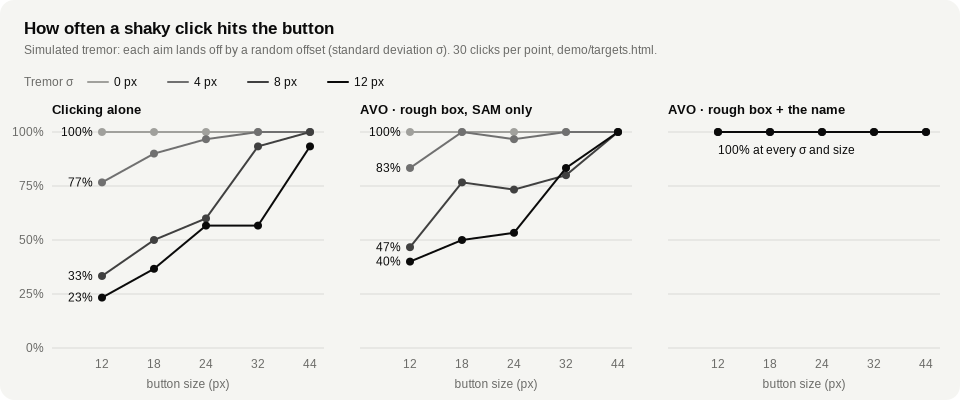
33% vs 100%: a 12 px button with 8 px of simulated tremor, hit when clicking alone vs with AVO, which finds the button by its name. When the app names its buttons (most do), AVO doesn’t need to aim at all: you box roughly and say the name. 33% vs 47%: the same with AVO aiming with SAM 3.1 only, for buttons without a name.
E3 · Wrong result, reported done without clarification
Three demo tasks, each with a real ambiguity: two Professor Smiths, “next Friday” said on a Saturday, two near-identical handouts. Three setups, 3 runs each per task: AVO as built; an agent that asks only before sending or booking; the agent alone. A script answered for the user, the way the task meant it. A run counts when it ends with the wrong result and reports it as done, without a clarification or target-check question. A final-action yes/no approval does not count as clarification.
Limits: 9 runs per setup, so a direction, not a rate. All three setups plan first, and the plan sometimes asks a question, so “the agent alone” isn’t completely silent. The tasks were chosen to contain an ambiguity. Results describe the November 1 build; later fixes have not been re-benchmarked. All 27 run records.
Why it matters: approving a send does not resolve which professor the user meant, and correcting the wrong choice can require extra manual work. So AVO asks a one-word question first (“Which Smith?” “Two.”). Across these runs AVO asked about one more thing per task.
Known limits, in full
Speaking is hard for you: AVO’s main input is your voice. You rely on a screen reader: AVO asks by drawing rings on the screen, and screen-reader users need a different kind of interaction. Not yet tried by the people it’s for; when it has been, this page will say what they said. Relies on your voice; typing works as a fallback (click the island). Needs a network connection and the Meta Model API. macOS only, on the main display, and best in the browser: desktop apps such as Finder are harder for it. Each task stops at 20 steps or $0.50 of API calls.